

Unlocking Productivity with Digital Tools
In today’s fast-paced world, staying organized and focused is more challenging than ever. Efficient planning is essential for anyone looking to enhance their productivity. With the right apps, you can transform your weekly routines, ensuring that important tasks are prioritized and completed effectively.
The Benefits of App-Based Planning
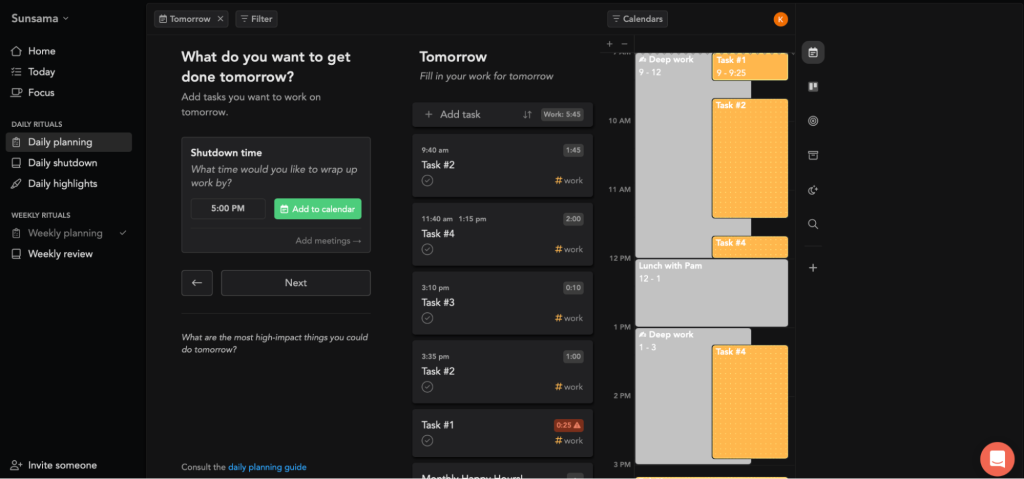
Utilizing technology for weekly planning offers several advantages that traditional methods simply can’t match. Most notably, these digital tools significantly enhance your management capabilities and streamline your workflow, enabling you to maximize productivity.
- Increased Focus: Digital planning tools help minimize distractions by allowing users to create a centralized hub for all tasks. For instance, by using a tool like Trello, you can segment your daily responsibilities into boards, cards, and checklists, which makes it easier to focus on one task at a time without the chaos of paper notes or scattered to-do lists.
- Better Prioritization: With features like deadlines, reminders, and categorization, apps simplify the process of ranking your tasks based on urgency and importance. For example, Todoist utilizes a color-coding system that aids in visualizing what needs immediate attention, making it easier to tackle high-priority items first.
- Flexibility: Life is unpredictable, and the ability to adjust plans quickly is vital. Digital tools like Notion allow users to drag and drop tasks within their interface, offering a more agile approach to handling fluctuations in priorities. This adaptability not only saves time but also reduces stress, as you can continuously fine-tune your schedule.
In addition to these benefits, the visual appeal and user-friendly design of many digital apps encourage regular engagement. Tools such as Trello provide a visually intuitive layout and gamification features, which can result in heightened motivation to complete tasks. You might find yourself more engaged when you can track progress visually and earn rewards for completed projects.
As you delve into the world of digital planning, you may uncover methods that enhance focus while paving the way for a more productive life. By leveraging these applications, you can build a more insightful approach to each week, making the most of your time and achieving your goals. Many users discover that after implementing such tools, they not only complete tasks more efficiently but also find themselves with surplus free time that can be reclaimed for personal interests, family, or self-care.
In conclusion, embracing digital tools for planning could well be the key to unlocking your full productivity potential. As you explore these various applications, consider choosing one that aligns best with your lifestyle and work habits, ensuring that you maximize your efficiency in both your personal and professional life.
LEARN MORE: Click here to enhance your planning skills
Harnessing Technology for Effective Time Management
As the demands of modern life continue to grow, finding ways to efficiently plan your week is more crucial than ever. Enter the world of productivity apps—digital tools specifically designed to help you manage your tasks and optimize your time. These applications are not just fads; they represent a strategic approach to maintaining focus and prioritizing responsibilities in a way that traditional planning methods often fail to achieve.
Understanding the Core Features of Planning Apps
To fully leverage the potential of digital planning, one must familiarize themselves with the core features offered by various apps. Here’s a closer look at some key functionalities that can revolutionize your weekly planning process:
- Task Organization: Most planning apps enable users to categorize tasks into projects, sub-tasks, and deadlines. Tools like Asana and Trello facilitate the creation of well-structured lists that can be easily customized, enabling users to visualize their workload from multiple perspectives, whether by project, priority, or due date.
- Collaboration Options: Many planning tools come equipped with features that allow for seamless collaboration. If you’re working as part of a team, platforms such as Microsoft To Do and Slack enable you to assign tasks to colleagues, share progress updates, and keep everyone on the same page. This is especially advantageous in remote work environments, where clear communication is essential.
- Analytics and Progress Tracking: The ability to measure productivity is a game-changer. Apps like Todoist provide built-in analytics to help users gain insights into their habits. By tracking completed tasks and daily progress, individuals can identify peak productivity times and adjust their planning accordingly, leading to further improvement in efficiency.
Moreover, these apps often integrate with other digital services, which can elevate your planning experience. For instance, tools like Google Calendar can synchronize with task management apps, allowing you to see your agenda and deadlines in one coherent view. This cross-functionality minimizes the risk of overlooked appointments and enhances your ability to prioritize effectively.
The adaptability of these applications also plays a significant role in improving focus. With features that allow you to adjust daily schedules swiftly, you can respond dynamically to changing priorities and unforeseen interruptions. This agility helps to maintain a steady workflow, ensuring that critical tasks are never lost in the shuffle.
Furthermore, the visual appeal of planning apps contributes to a more engaging user experience. Aspects like color coding and customizable layouts can make the process of planning not only more attractive but also more intuitive. Research has suggested that engaging with visually appealing interfaces can boost motivation, making it easier to commit to your weekly plan.
By understanding and utilizing these core features, individuals can effectively harness the capabilities of productivity apps to enhance their planning process. As you venture further into using digital tools for efficient weekly planning, you may find that the newfound structure and organization lead to a more balanced, fulfilling lifestyle.
Maximizing Productivity with Task Management Apps
When it comes to efficient weekly planning, task management apps have emerged as invaluable tools that help individuals maintain focus and prioritize effectively. These apps align with the modern necessity of managing time and tasks in a fast-paced environment. A streamlined interface allows users to categorize tasks, set deadlines, and break larger projects into manageable subtasks. This not only reduces overwhelming feelings associated with heavy workloads but also enhances one’s ability to concentrate on the task at hand.
Features That Boost Focus and Productivity
A multitude of task management apps available today comes packed with features designed to improve organization and efficiency. For instance, apps like Todoist and Trello offer reminder systems that can notify users about impending deadlines. These reminders serve as a gentle nudge to keep individuals on track and focused. Additionally, the option to integrate calendars ensures that all commitments are visible in one place, allowing for a clear overview of the week.The flexibility of these applications is another significant advantage. Users can customize them according to their personal workflows, whether they prefer a priority-based system or a time-blocking strategy. The ability to adapt these tools to individual needs makes it easier to foster a routine that effectively boosts productivity without burnout.
Collaboration and Accountability
Many task management apps facilitate collaboration, allowing teams to share progress and updates in real-time. This feature not only promotes accountability among team members but also enhances communication, ensuring that everyone is aligned on objectives. By leveraging these benefits, organizations can increase overall productivity while enhancing individual focus through clear prioritization.A crucial aspect of utilizing task management apps is their capability to provide insights into one’s productivity trends over time. Users can analyze completed tasks and identify peak productivity windows, thereby optimizing their weekly planning strategies further. This data-driven approach empowers individuals to make informed decisions about how to allocate their time most effectively. By incorporating these tools into your weekly planning routine, you can significantly enhance both your focus and prioritization abilities. It’s an investment in time management that reaps substantial rewards, leading to greater personal satisfaction and professional success.
| Category | Features and Benefits |
|---|---|
| Task Organization | Categorization of tasks and subtasks for clarity. |
| Deadline Reminders | Notifications that help maintain focus on important tasks. |
Integrating apps into your weekly planning can profoundly influence your focus, helping you prioritize what’s truly essential in a demanding world. Each feature is designed to adapt to individual and team workflows, creating a smoother pathway to achieving your goals.
DON’T MISS: Click here to enhance your planning skills
Enhancing Focus with Specialized Features
In the quest for efficient weekly planning, it’s not just about having basic task management; it’s how well these apps augment your ability to concentrate on what truly matters. Apps are increasingly incorporating specialized features that go beyond simple list-making, tailored to help users boost their focus and productivity levels.
Time Management and Pomodoro Techniques
One such feature gaining popularity is the integration of the Pomodoro Technique, a time management method that breaks work into intervals, traditionally 25 minutes in length, separated by short breaks. Apps like Focus@Will and Toggl support this technique, creating a structured environment where distractions are minimized. By setting timed sessions for tasks, users can develop a focused work rhythm, allowing them to accomplish more in less time.
Moreover, many of these applications provide reminders and alerts to keep you on track. For example, Forest uses gamification by allowing users to “grow trees” for time spent working without distractions. This not only makes the process enjoyable but also anchors your concentration to tangible results. The psychology behind this method is quite compelling: when you see a visual representation of your focused time, it reinforces positive habits and encourages you to stick with your plan.
Customizable Notifications and Smart Integration
Understanding that the flow of our week is often interrupted by unexpected obligations, successful planning apps allow for complete customization of notifications. Users can set reminders for not only when tasks are due but also for the best time to start them based on their own productivity patterns. With intelligent features seen in apps like Google Keep and Evernote, users can configure notifications that align with their unique workflow, ensuring nothing falls through the cracks.
Mind Mapping and Brainstorming Tools
Another compelling facet of many planning apps is the inclusion of mind mapping tools. Visualization has proven to enhance understanding and retention of complex information. Applications like XMind and MindMeister provide platforms for brainstorming and visualizing ideas in a way that is intuitive. Utilizing these tools can facilitate clarity in planning and spark creativity when organizing tasks. When you can see how your tasks are interconnected, prioritizing becomes not only easier but also more strategic.
Research shows that using visual-spatial information can facilitate cognitive load management, which means users can handle more tasks without feeling overwhelmed. As you plan your week utilizing these mind mapping features, the resulting clarity can lead to a natural reassessment of priorities—helping you to focus on what truly matters for your personal and professional ambitions.
Integrating Health and Well-Being Features
Incorporating health and well-being tracking into your planning app can significantly influence productivity. Applications like MyFitnessPal and Headspace not only aid in tracking physical wellness but also encourage mental health practices, reminding users to incorporate exercise, meditation, or simply to take breaks. These prompts can greatly enhance your capability to focus, as they help maintain a balanced lifestyle. By ensuring that you allocate time for well-being, you can improve cognitive performance and be at your most productive state.
With the prevalence of work-related burnout becoming a concern, apps that facilitate wellness are not merely optional; they are essential tools for sustaining long-term productivity. Thus, having a comprehensive app that encompasses different aspects of life can provide a holistic approach to weekly planning.
By integrating these specialized features into your planning routine, you can effectively navigate the complexities of your week, thereby enhancing focus and cultivating a sense of achievement in both your personal and professional life.
DISCOVER: Click here to learn how to enhance your time management
Conclusion: Transforming Your Planning Strategy
In the realm of efficient weekly planning, the right apps can be transformative, elevating your ability to focus and prioritize effectively. As we’ve explored, features such as time management tools, customizable notifications, mind mapping capabilities, and wellness integrations all contribute to creating a robust framework for productivity. These apps not only help streamline task management but also promote healthy habits and provide visual aids that enhance cognitive processing.
The integration of techniques like the Pomodoro Method allows users to structure their work periods in a way that minimizes distractions while maximizing output. Gamification elements encourage retention and motivation, making planning not just a task but an engaging experience. In a world where distractions abound, tools that help you tune out the noise become essential allies in achieving personal and professional goals.
As you consider implementing these applications into your routine, it’s crucial to identify what functionalities align best with your unique needs. Take the time to explore various options and customize them to fit seamlessly into your workflow. Remember, the goal of utilizing technology in your planning process is to enhance your focus and enable you to prioritize effectively, leading to improved outcomes.
In conclusion, the journey towards better planning starts with a willingness to embrace the tools at our disposal. By leveraging the power of modern technology, you can enhance your productivity, maintain a healthy work-life balance, and ultimately create a fulfilling weekly schedule that prioritizes what truly matters. Take the first steps today, and watch as your weekly planning evolves into a powerful conduit for success.
Related posts:
How Digital Tools Can Transform Your Daily Planning and Increase Your Productivity
Task Management: Digital Tools for Prioritization and Efficiency
Building Productive Habits: The Importance of Digital Tools in Establishing Work Routines
Setting Goals with Technology: Apps to Build Self-Discipline Habits
Integrating Digital Tools to Optimize Workflow and Personal Organization
Maximizing Efficiency: How Digital Tools Help with Time Management and Personal Organization

Beatriz Johnson is a seasoned productivity strategist and writer with a passion for simplifying the complexities of time management and personal organization. With over a decade of experience in efficiency optimization, she specializes in topics like workflow design, habit formation, and productivity systems for modern professionals. Through her work, Beatriz empowers readers to take control of their schedules, eliminate overwhelm, and stay ahead in today’s fast-paced world.